When visitors arrive at your website, you want to let them know that it is worth staying and checking out. A simple feature that can enhance the perceived value of your site is translation. And, in my previous post I discussed translation widgets from Google and Yahoo. This week we'll add two additional features that can be applied to a broad range of websites, Text2Speech and Web2PDF.
vozMe provides text to speech widgets that you can easily paste into your website code. The options for configuring this widget include various interfaces and either a male or female voice. You can also specify exactly what text you want read or have visitors select the text that they want to hear. vozMe supports plugins for Blogger, WordPress, and Joomla. Here is an example of the vozMe text to speech widget:
Another useful utility is BCL Technologies' Web2PDF Online, which allows visitors to print your pages as PDF files. When you create a copy of this widget, you have the option of setting the margins of the PDFs that your visitors generate. Here's an example if you want to give it a try:
I've used vozMe and Web2PDF together with Google Translate to enhance my WhyPark site:
www.GreenEnergyProject.com
I've also added them to the right column of the Widget Wonk blog.
You can get a copy of the code for vozME text to speech at:
http://vozme.com/webmasters.php?lang=en
After (free) registration, Web2PDF Online is available at:
http://web2.pdfonline.com/
Showing posts with label WordPress. Show all posts
Showing posts with label WordPress. Show all posts
Saturday, August 30, 2008

Monday, August 4, 2008
Learning from WordPress was a Snap
Before there was Widget Wonk on Blogger there was Widget Wonk on WordPress. (A remnant of Widget Wonk WordPress still exists at WidgetWonk.WordPress.com) We liked WordPress. It offers a choice of attractive blog designs and a feature-rich blog management interface. However, WordPress doesn't allow widgets that generate income. And, given the nature of this blog, that made us decide to pack up and move.
We picked up a tip from WordPress before we left. There are automatic previews of the destinations for all links within WordPress blogs. Here is an image from Widget Wonk WordPress showing the preview for a link to WhyPark.
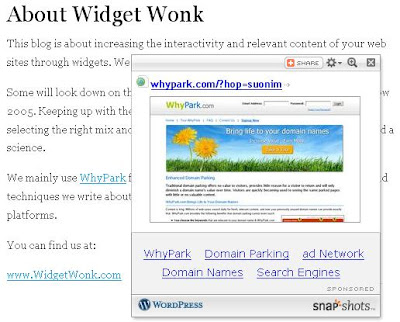
These previews appear in pop-up windows that are provided by Snap. Each preview window contains ads just below the image of the previewed site. We assume that WordPress has a deal with Snap to share the income generated by these ads.
You can install Snap previews in your WhyPark sites. First set up an account at Snap.com, and then paste the Snap code for each domain into the top of its HTML field. Here is an example:
www.PainReducers.com
Placing your cursor over any of the links to external sites on this site will display a Snap preview. Notice that the preview of the link to Wikipedia allows users to read Wikipedia text from your WhyPark site. Similarly, the Snap preview of the YouTube link provides visitors with the ability to view a YouTube video without leaving.
Snap shares the ad space below the destination image with you. That is, they allow you to put your own ads there, but will display their ads most of the time. We used Clickbank to create text ads for these spaces. You might need to open several Snap previews before you see one of our Clickbank ads.
Here is a second WhyPark site with Snap installed:
www.WomenofFinance.com
The "Glass Hammer" links connect to RSS feeds, and Snap's previews allow you to begin to read them by clicking the RSS icon near the upper left of the preview windows. The following screen grab shows RSS content with one of our Clickbank ads below.
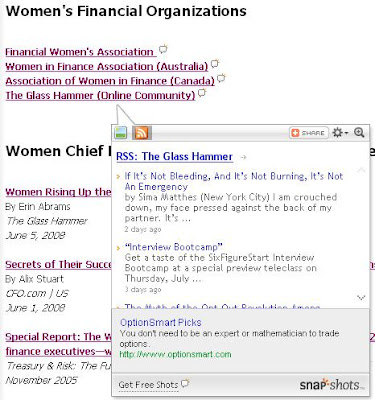
As of this writing, WomenofFinance showed four external links from WhyPark-supplied articles. Snap provides previews of these sites too. You also have the option of activating previews for links within the same site. However, we don't think previews of screens within the same WhyPark site are very useful.
Overall, We're not too excited about Snap. Snap previews add some useful interactivity, but reserve the lion's share of the resulting income for themselves. That said, we'll keep them in mind for sites with external links to Wikipedia articles, YouTube videos, and RSS feeds. Snap's previews could be a handy way to allow visitors to sample this type of external content without leaving your site.
One final note about Widget Wonk on WordPress. We recently created a widget for the Widget Wonk blog, and tried to install this widget on WordPress. It didn't work. Those guys/gals really cramp our style.
We picked up a tip from WordPress before we left. There are automatic previews of the destinations for all links within WordPress blogs. Here is an image from Widget Wonk WordPress showing the preview for a link to WhyPark.
These previews appear in pop-up windows that are provided by Snap. Each preview window contains ads just below the image of the previewed site. We assume that WordPress has a deal with Snap to share the income generated by these ads.
You can install Snap previews in your WhyPark sites. First set up an account at Snap.com, and then paste the Snap code for each domain into the top of its HTML field. Here is an example:
www.PainReducers.com
Placing your cursor over any of the links to external sites on this site will display a Snap preview. Notice that the preview of the link to Wikipedia allows users to read Wikipedia text from your WhyPark site. Similarly, the Snap preview of the YouTube link provides visitors with the ability to view a YouTube video without leaving.
Snap shares the ad space below the destination image with you. That is, they allow you to put your own ads there, but will display their ads most of the time. We used Clickbank to create text ads for these spaces. You might need to open several Snap previews before you see one of our Clickbank ads.
Here is a second WhyPark site with Snap installed:
www.WomenofFinance.com
The "Glass Hammer" links connect to RSS feeds, and Snap's previews allow you to begin to read them by clicking the RSS icon near the upper left of the preview windows. The following screen grab shows RSS content with one of our Clickbank ads below.
As of this writing, WomenofFinance showed four external links from WhyPark-supplied articles. Snap provides previews of these sites too. You also have the option of activating previews for links within the same site. However, we don't think previews of screens within the same WhyPark site are very useful.
Overall, We're not too excited about Snap. Snap previews add some useful interactivity, but reserve the lion's share of the resulting income for themselves. That said, we'll keep them in mind for sites with external links to Wikipedia articles, YouTube videos, and RSS feeds. Snap's previews could be a handy way to allow visitors to sample this type of external content without leaving your site.
One final note about Widget Wonk on WordPress. We recently created a widget for the Widget Wonk blog, and tried to install this widget on WordPress. It didn't work. Those guys/gals really cramp our style.
Subscribe to:
Posts (Atom)